
COMPETITOR COMPARISONS
Compare RemoteToPC
with Leading Remote
Access Software
Explore detailed, side-by-side comparisons to see how RemoteToPC stacks up against leading remote access solutions. Compare pricing, features, security, and IT management tools to find the best fit for your business.
- Secure & Reliable
- Trusted by Businesses
- Built for IT Teams
- Global Access
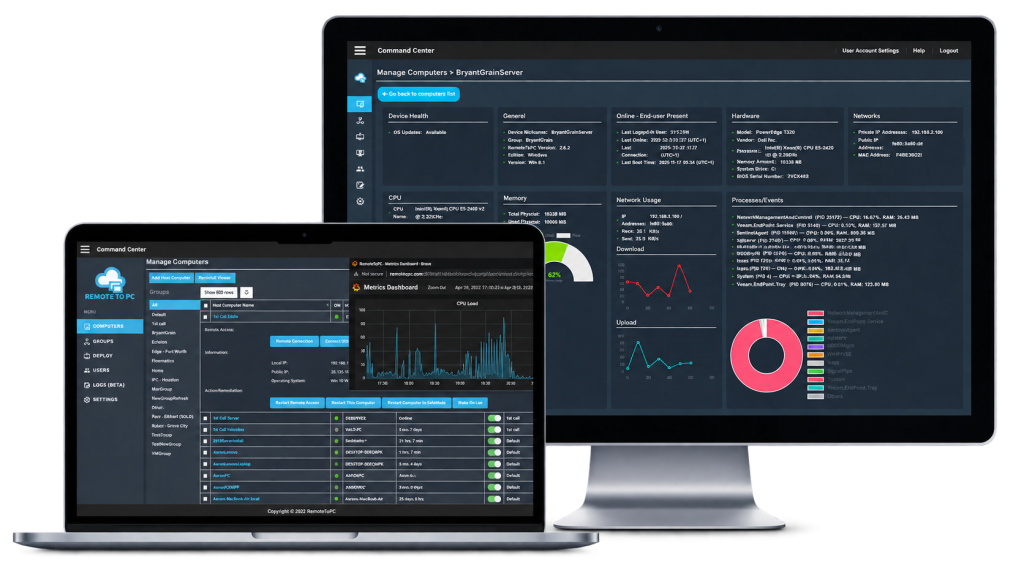
Choose a Comparison
Get the facts. See how RemoteToPC compares to the remote access solutions most likely to be considered by small businesses, IT teams, and growing organizations.
RemoteToPC vs
TeamViewer
Compare pricing, features, security,
IT management tools, and overall value.
- Unattended access
- IT management features
- Pricing & licensing
- Support and security
RemoteToPC vs
AnyDesk
Compare licensing, concurrent connections,
managed devices, and remote administration.
- Unattended access
- Concurrent connections
- Pricing & licensing
- Deployment options

RemoteToPC vs
LogMeIn Pro
Compare remote access pricing, user access,
remote-work tools, and business value.
- Remote access & file transfer
- Unlimited-user access
- Pricing for 10 computers
- Remote-work features
RemoteToPC vs
GoToMyPC
Compare business remote access, per-computer pricing, team access, and remote-work value.
- Remote access for office PCs
- Multi-user business access
- Pricing per computer
- Remote-work features
RemoteToPC vs
RemotePC
Compare pricing, deployment,
monitoring, and business value.
- Computer-based pricing
- Team access
- Deployment & management
- Monitoring & support
RemoteToPC vs
Zoho Assist
Compare unattended access, technician workflows,
diagnostics, deployment, & IT support.
- Unattended access
- Remote support tools
- Diagnostics & deployment
- Pricing & licensing
Not sure which solution is right for you?
Start with the product you already use or are considering. Each comparison focuses on practical differences in pricing, licensing, remote access, and IT-management capabilities.
More
Comparisons
Additional remote access software comparisons.
Compare RemoteToPC pricing and plans, or learn more about our remote management tools for IT teams.
Frequently Asked Questions
Answers to common questions about RemoteToPC, TeamViewer, pricing, licensing, and remote IT management
How does RemoteToPC pricing compare to TeamViewer?
RemoteToPC starts at $8.25 per month equivalent, billed at $99 per year for the Basic plan. TeamViewer Business is $50.90 per month equivalent, or $610.80 per year, making RemoteToPC a lower-cost option for many businesses managing multiple computers.
What is the difference between computer-based and user-based pricing?
RemoteToPC starts at $8.25 per month equivalent, billed at $99 per year for the Basic plan. While some competitors use user-based licensing models, RemoteToPC is priced by the number of computers, which can make it a more cost-effective option for businesses managing multiple devices.
Does RemoteToPC support unattended remote access?
Yes. RemoteToPC is designed for unattended remote access, allowing authorized users to connect to remote computers without someone being present at the host machine.
Does RemoteToPC include monitoring and IT management tools?
Yes. RemoteToPC includes monitoring and alerts along with IT management features designed to help businesses and IT teams manage remote computers more efficiently. Available capabilities vary by plan.
Can multiple users access RemoteToPC?
Yes. RemoteToPC offers multi-user and team-management capabilities on supported plans, making it suitable for IT departments, MSPs, and growing businesses.
Is it easy to switch from TeamViewer to RemoteToPC?
Yes. You can install RemoteToPC on the computers you want to manage and begin using RemoteToPC without changing the underlying Windows environment. Businesses can transition computers gradually rather than moving every device at once.
Which is better for a small or growing business: RemoteToPC or TeamViewer?
It depends on your needs, but RemoteToPC may be a better fit for businesses that want straightforward computer-based pricing, unattended access, and IT management features without the higher cost of a larger enterprise remote-support platform.
Experience a Better Way to Manage Remote Access
Powerful features. Simple pricing. Built for individuals, businesses, and IT teams.